
For self-managed HOA boards
HOA management software that fits how your board actually works
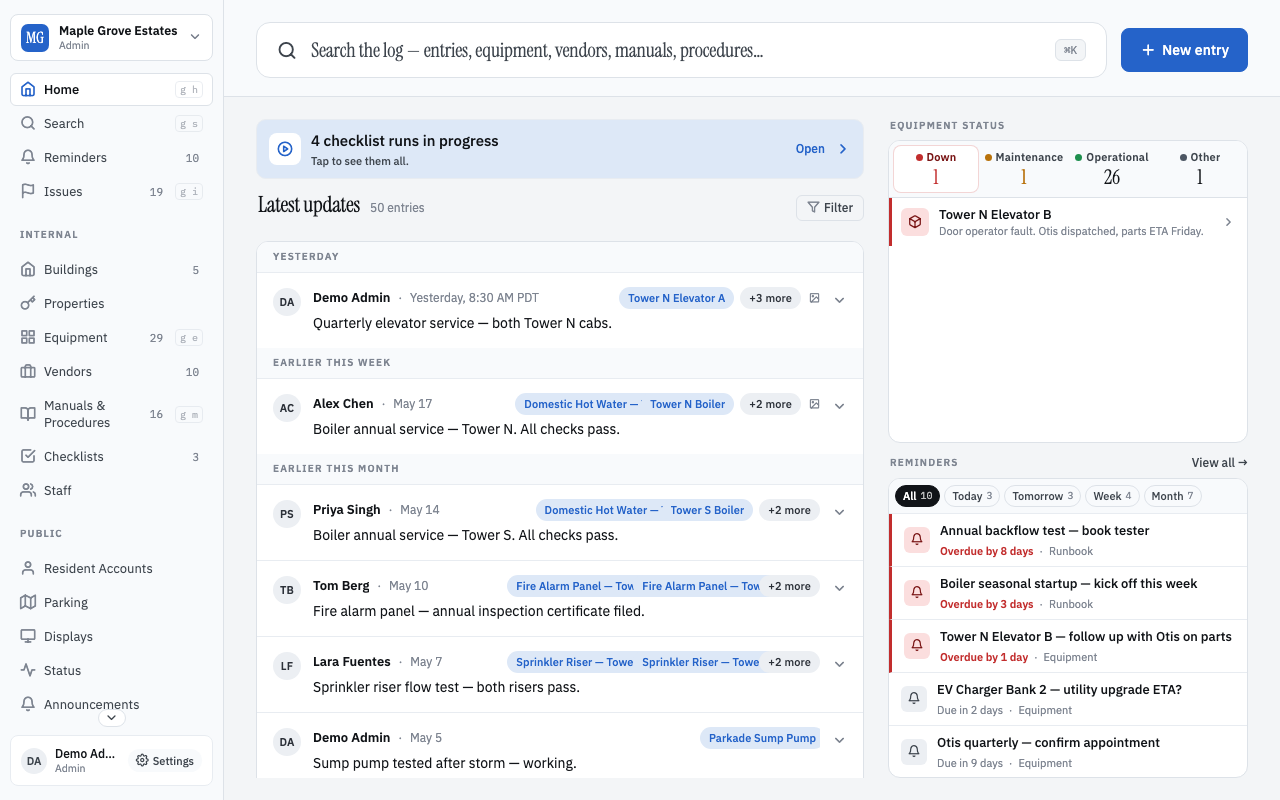
Most HOA management software is accounting software with a resident portal bolted on. BuildingHQ is the other half — the operational side your board is doing in spreadsheets, group texts, and a shared inbox today. Track issues, keep equipment history, manage vendors, run announcements and a public status page, offer residents a portal, and coordinate visitor parking. From one app on every device.
What HOA operations actually looks like day-to-day
The self-managed HOA board's work isn't spreadsheets. It's the lobby door that won't latch, the pool pump nobody has serviced in three years, the vendor whose phone number changed, the visitor whose car got towed, the resident who wants to know when the elevator will be back. BuildingHQ has a first-class surface for each of these:
Issue tracking
Residents file reports from the portal. Board members triage from a kanban. Every issue carries its full conversation and resolution history.
Equipment history
Every boiler, pump, elevator, and panel has its own page — serial, install date, service log, manuals, vendor contacts. The 2019 boiler incident is still findable in 2029.
Vendor rolodex
Your plumbers, electricians, elevator co., landscapers — with contact info, notes, and a running history of what they did and when. Survives board turnover.
Announcements
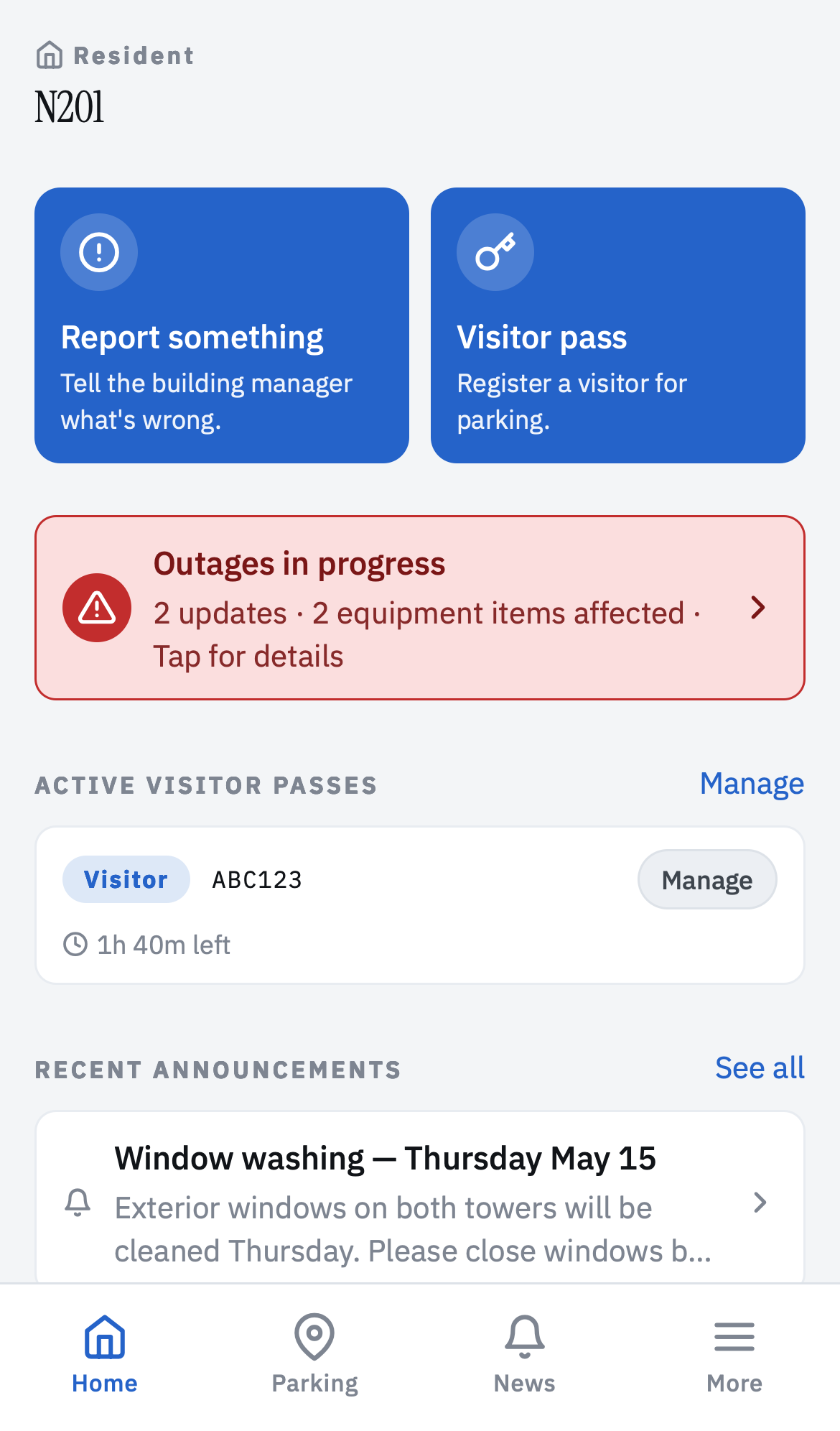
Broadcast a notice once. It lives on a persistent, searchable page residents can find later. Not a mass email that disappears into inboxes.
Public status page
Pool closed for maintenance. Elevator 2 out of service. Water shutoff 10 to 2. Residents see it without asking; the board fields 90% fewer phone calls.
Visitor parking
Residents register guest plates from their phone. Patrol walks the lot and scans plates. Unmatched plates go to the board for review — enforcement stops being personal.
Manuals + procedures
A searchable library for the boiler manual, the fire panel card, the burst-pipe SOP, the emergency call tree. Findable at 2 AM on a phone.
Reminders + checklists
Annual backflow test, quarterly fire panel inspection, seasonal drain flush. The compliance calendar that doesn't get missed.
Lobby TV displays
A rotating dashboard for the elevator lobby — what's out, what's scheduled, welcome messages, weather. Runs on any smart TV or a $50 Fire Stick.
What BuildingHQ deliberately does not do
Honest scope beats a bloated feature list. BuildingHQ does not handle:
- Accounting, dues collection, reserves. Keep your accounting tool. Attach the invoice PDF or export a CSV between systems.
- Violation tracking with fines. Log an issue, yes. Assess a fine? No — that's a bylaw + legal workflow that belongs in a purpose-built product.
- Vendor marketplaces. BuildingHQ tracks vendors you already work with. It doesn't hand you a list of pre-vetted strangers.
- Property listings, rentals, resale packages. Use a specialized tool for realtor packets.
For the board
Board members use BuildingHQ on their phone in a mechanical room as often as at a desk. Every surface is designed for that context — three taps to log an entry, offline capture, plain-language search, no login-and-hunt.
Board turnover doesn't erase memory. Every entry, every equipment record, every vendor note, every procedure survives the outgoing board. New board members read the last twelve months in an afternoon.
For residents
Residents don't need email accounts. They log in with a unit code from a printed card. From the portal they can:
- See building announcements and status updates.
- File a report (leak, noise, hallway light out).
- Register a visitor parking pass with a plate number.
- Look up building rules, bylaws, parking policy.
No app install required. Everything works in a browser on any device.
HOA pricing that doesn't punish small buildings
Basic is free forever for internal board and staff use, any building size, no credit card. The log, equipment, vendors, manuals, procedures, issues, reminders, checklists.
Standard — $39/month + $0.50 per resident account/month — adds resident accounts, announcements, public status page, visitor parking, lobby TV displays. Free for 30 days.
Pro — $99/month + $0.60 per resident account/month — is Standard with higher limits: unlimited resident accounts, 500 GB attachments, 50 lobby displays, priority support. For bigger HOAs.
Frequently asked questions
Is BuildingHQ HOA management software?
BuildingHQ is operations software for HOAs, not accounting or dues software. It handles what the board actually does day-to-day: tracking issues, keeping equipment history, managing vendors, publishing announcements, running the resident portal, coordinating visitor parking, and running lobby displays. Financial management (dues, budgets, reserves) stays in your accounting tool — most self-managed HOAs use QuickBooks, PayHOA, or Buildium for that side.
Does BuildingHQ replace our property manager?
It can, if your HOA is self-managing or wants to. It can also complement a property manager by giving the board its own visibility into what's happening — the log survives the manager, so a change of firm doesn't erase your building's memory. See our post on self-managed vs property management for the honest tradeoffs.
How much does it cost for a small HOA?
The Basic tier is free forever for internal board and staff use — the log, equipment, vendors, manuals, procedures, issues, reminders, and checklists. If you want resident accounts, announcements, a public status page, visitor parking, or lobby TV displays, Standard is $39/month base plus $0.50 per resident account. A 40-unit HOA with all residents on the portal runs about $59/month.
Do residents need email accounts?
No. Residents log in with a unit code from a printed card the board mails or hands them at move-in. Emails, phone numbers, and names are all optional metadata the board controls. This is deliberate — a meaningful fraction of residents don't check email daily, and the HOA operates for all of them.
Can we import our existing spreadsheets?
Yes. The smart importer accepts CSV or Excel files and figures out which columns map to which BuildingHQ fields — you don't need to reshape your spreadsheet into a template. Equipment lists, unit registers, vendor rolodexes, parking allocations all work. See the smart import guide.
Does it work offline?
Yes. An entry written from a phone in a mechanical room with no signal saves locally and syncs when connectivity returns. Photos and voice memos attach immediately.
Is BuildingHQ available in Canada?
Yes. BuildingHQ is used by HOAs in the US and strata corporations across Canada. The vocabulary (HOA vs strata, board vs council, dues vs strata fees) is settings-configurable, and the core concepts translate across both.
Read more
- Self-managed vs property management — an honest guide
- Why HOAs quietly lose their memory (and what to do about it)
- Board turnover: the annual reset problem
- The first hour of a real emergency
Free for internal use forever. 30-day trial of the resident and parking features. No credit card.
Start free