
Equipment
Every boiler, elevator, and pump — with its full history
Equipment history is a self-managed building's most valuable and most fragile asset. BuildingHQ gives every piece of equipment its own page, with the model, serial, install date, service log, attached manuals, and vendor relationships in one place. The 2019 boiler incident is still findable in 2029.
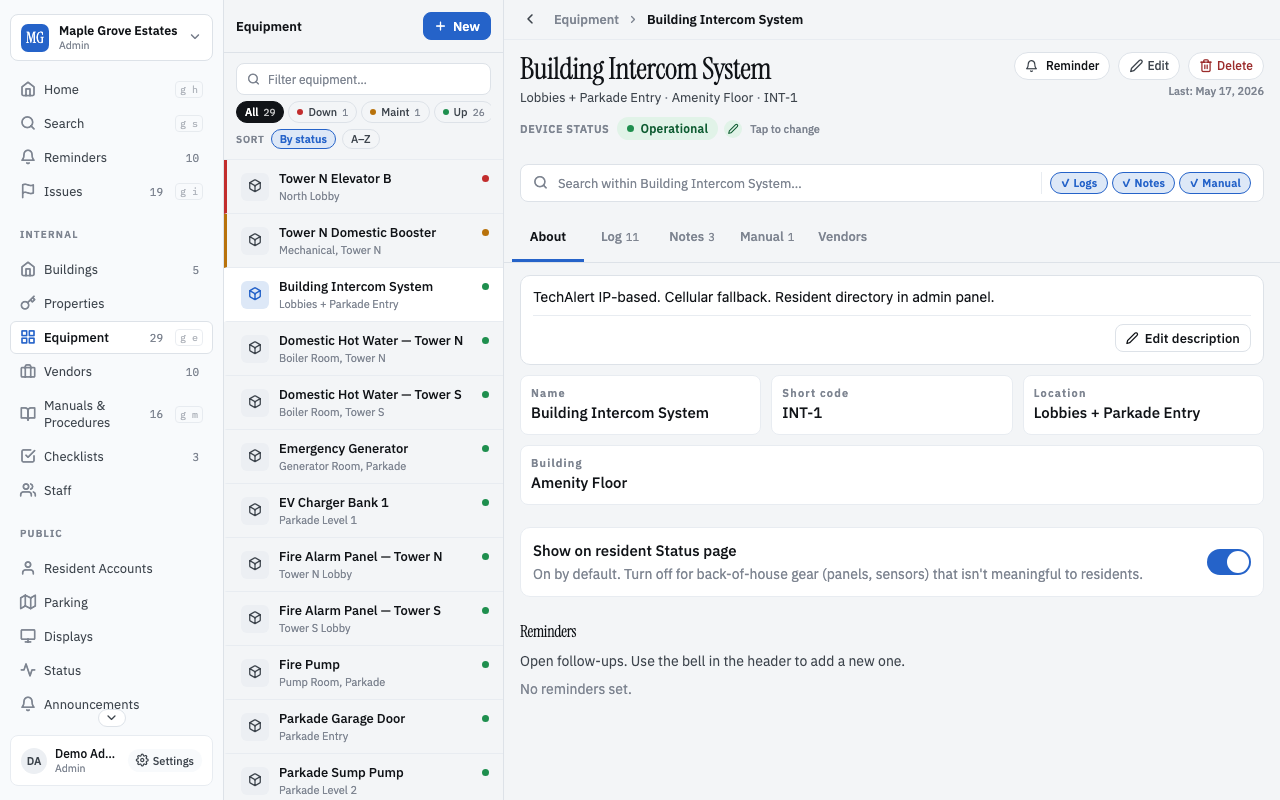
One page per piece of equipment
Each piece of equipment has its own page. The board member arriving at a mechanical room opens the boiler's page on their phone and sees:
- Model, serial, install date.
- Location — which mechanical room, which floor, which building.
- Status — in service, needs attention, out for parts, decommissioned.
- Every log entry ever written against it, newest first.
- Attached manuals and warranty documents.
- The vendor(s) who service it, with contact info.
- Active reminders and past checklist runs.
The page loads offline. Bad signal in the mechanical room? The last-cached version is still there.
Service history in 30 seconds
Every service visit lands as a log entry. On a phone in a mechanical room, that's:
- Open the equipment page.
- Tap "log entry".
- Type or dictate what happened.
- Attach a photo and the vendor's invoice.
- Submit.
Under 30 seconds on our internal target. Offline entries queue and sync when signal returns.
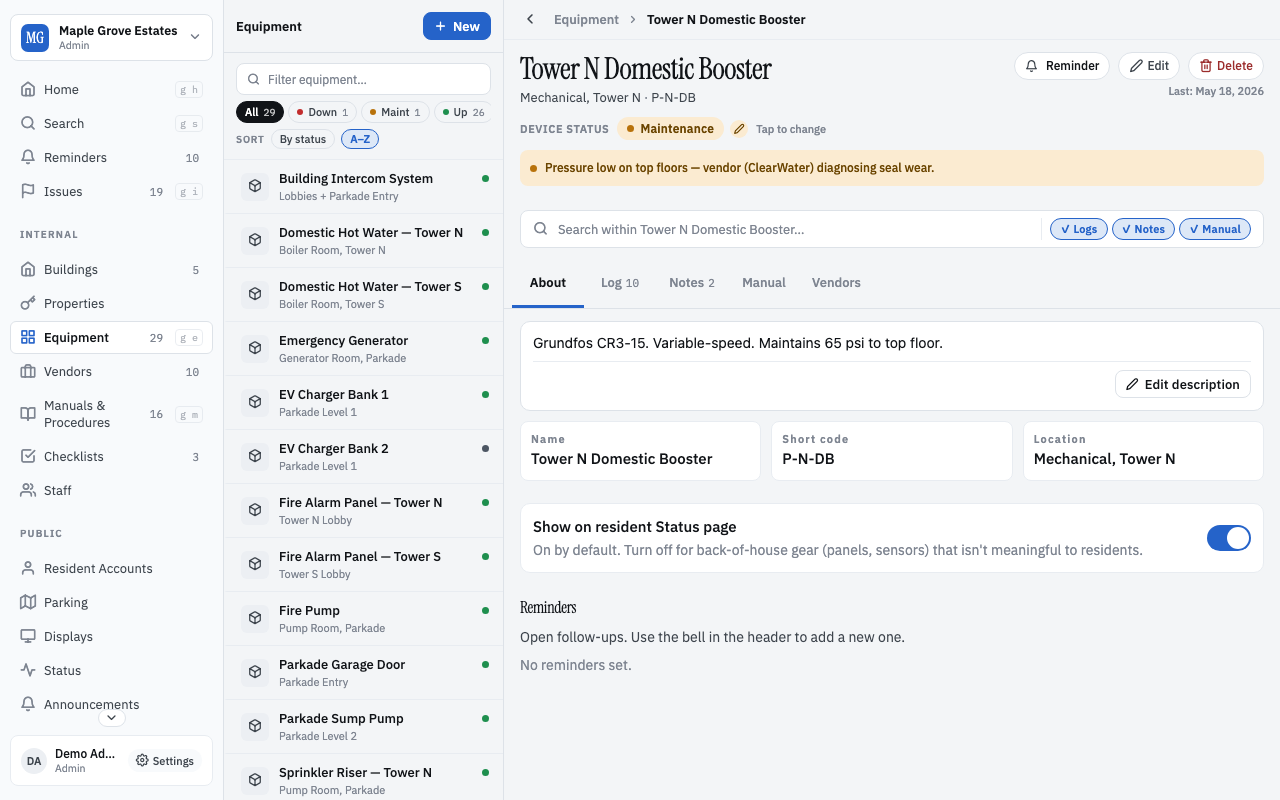
Recurring maintenance that doesn't get missed
Every piece of equipment carries its own reminders. Common ones a self-managed building sets up on day one:
- Annual backflow preventer test.
- Quarterly fire panel inspection.
- Semi-annual boiler service.
- Monthly generator run.
- Annual elevator maintenance contract renewal.
- Seasonal drain-line flush before freeze.
Reminders surface to the board with lead time. When the service is completed, marking the reminder done recurs it on schedule. Miss one and it shows up on the compliance dashboard.
Manuals right where you need them
A boiler manual on Dropbox at 2 AM is a document you can't find. A boiler manual attached to the boiler page in BuildingHQ is a document you tap once to open. Same file — different findability.
Every equipment page can attach any number of manuals, warranty certificates, engineer reports, and MSDS. Searchable, tagged, deep-linkable.
Pricing
Equipment tracking is part of the Basic tier — free forever for internal board and staff use, any building size, no credit card. You get the log, equipment, vendors, manuals, procedures, issues, reminders, and checklists on Basic. Standard and Pro add resident-facing features on top.
Frequently asked questions
Is this a full CMMS?
No — and deliberately not. Enterprise CMMS software targets industrial facility managers; the vocabulary, the workflows, and the price are wrong for a self-managed HOA or strata. BuildingHQ keeps equipment history without imposing work orders, SLAs, or ticketing rituals a small board won't sustain.
What kinds of equipment does it track?
Any building equipment with a name and a location. In practice: boilers, HVAC, HRVs, elevators, pumps, sprinkler risers, fire panels, backflow preventers, intercoms, garage doors, EV chargers, pool equipment, generators, roof-top units. Add a page, log service entries against it.
How does service history get recorded?
Each service visit lands as a log entry against the equipment: date, vendor, notes, photos, attached invoice. It takes about 30 seconds on a phone. The equipment page shows the full timeline, sorted newest first.
Can vendors log their own visits?
Yes. Vendor one-time links let a plumber or elevator technician log their visit from a link the board sends. No account required for the vendor. Their entry attaches to the equipment automatically.
Where do manuals live?
Attached to the equipment page. The boiler's manual PDF, the elevator technical spec, the fire panel troubleshooting card — one attach button, findable in three taps from the equipment page.
Can we import our existing equipment list?
Yes. The smart importer accepts CSV or Excel — equipment lists with model, serial, install date, location, last-serviced date, vendor. It maps whatever columns you have. See the smart import guide.
Do reminders work for recurring maintenance?
Yes. Set a reminder on the equipment page — 'annual backflow test', 'quarterly fire panel inspection', 'seasonal drain flush'. Reminders surface to the board with lead time. When the service is done, mark the reminder complete and it recurs on schedule.
Read more
- The $40K boiler — why equipment history is your most fragile asset
- The inspection you missed — compliance calendars that actually work
- Why Dropbox isn't a manuals library
- The vendor Rolodex as an institutional asset
Start capturing equipment history today. Free forever for internal use, no credit card.
Start free